

Instead of arranging a Rolex purchase and payment plan separately, check whether Tabby is offered for your exact order at checkout, then review the repayment terms before authorising payment. To buy a Rolex in Dubai with instalments in 2026, follow that sequence rather than assuming every watch or transaction qualifies.
- For buy rolex dubai installments searches, verify Tabby at checkout before committing to a watch.
- Royal Watches sells luxury watches online; payment eligibility must be checked separately.
- Review the repayment schedule and purchase documentation before authorising payment.
- Keep the retailer’s order confirmation separate from Tabby’s payment confirmation.
Why this matters
A watch purchase involves two separate decisions: whether the timepiece meets your requirements and whether the payment arrangement suits your finances. An instalment option does not establish a watch’s authenticity, condition, ownership history or suitability.
Royal Watches is a luxury-watch retailer for buyers seeking premium timepieces online, not a guarantee of Tabby approval. Begin with Royal Watches to assess the watch, then establish the payment route for the specific transaction.
For a 2026 purchase, treat the terms displayed during your transaction as the terms to review. An older screenshot, a search result or another buyer’s experience is not your repayment agreement.
The workflow below separates watch selection, payment eligibility and order confirmation. That distinction prevents a common buying mistake: treating a payment-provider message as proof that every part of the purchase is complete.
Before you start
- Prepare your purchase details: Identify the exact Rolex reference you want, your preferred configuration and the condition you will accept. Have your delivery and contact details ready, alongside access to the payment method you intend to use.
- Prepare access for verification: Keep access to your own phone, email and any existing Tabby account. Enter personal or payment information only through the retailer’s checkout and the payment provider’s own authentication flow.
- Check the transaction-specific restriction first: Proceed with this guide only if Tabby is offered for your exact order. A retailer-level payment reference does not establish that a particular watch, basket or buyer qualifies.
Do not start by choosing the longest repayment period. Start by identifying the watch and the evidence you need to assess it. Payment convenience belongs after the purchase criteria, not before them.
Watch selection and purchase records
Establish the exact watch
- Identify the Rolex reference and configuration you intend to purchase. Distinguish the model family from the exact watch: a shared collection name does not make two listings interchangeable.
- Read the description for the individual timepiece. Establish whether its condition, accompanying documents and included accessories match your requirements; request clarification where the description leaves an important question unanswered.
- Ask how authenticity is established and what evidence accompanies the purchase. Do not treat a payment provider’s involvement as authentication of the watch.
- Review the applicable delivery, return and warranty terms before proceeding. Keep the terms relevant to your transaction rather than relying on assumptions about luxury-watch retail.
- Retain a copy of the listing and the seller’s written answers. Your purchase record should describe the watch you selected, not merely the collection name.
Expected result: You can identify the exact timepiece, explain why it meets your requirements and locate the purchase terms you reviewed.
If you are still deciding between Rolex collections, use the Rolex watches for men in the UAE guide to organise your shortlist. Return to the individual listing for transaction-specific details; a collection guide cannot replace the description of the watch being sold.
Create a purchase checkpoint
Before entering the payment flow, complete 3 checks: the watch matches your selection, the purchase documentation answers your material questions, and the checkout order matches the intended purchase.
This checkpoint matters because a financing decision can distract from the object being bought. Keep the watch reference and configuration beside you while reviewing the order. If anything differs, resolve the discrepancy before authorising payment.
For your 2026 records, retain the transaction date alongside the listing and any written clarification. That gives your purchase file context without relying on a page remaining unchanged after the sale.
Tabby eligibility and repayment review
Establish the payment route
- Proceed to the retailer’s checkout with the intended watch and delivery details. Check that the order summary still matches your selection.
- Inspect the payment methods presented for that order. Select Tabby only if it is offered in the actual checkout flow.
- Follow the verification instructions presented by Tabby. Use your own details and check information carefully before submitting it.
- Read the decision and the terms returned for your transaction. Do not infer approval from seeing a Tabby name or logo before verification.
- If Tabby is not offered, stop the Tabby workflow. Ask the retailer which payment routes apply to the intended purchase without assuming an instalment arrangement exists.
Expected result: You have either a transaction-specific Tabby offer to review or a clear reason to stop this payment route.
There is no universal sequence of button names for every checkout. Follow the labels on the screen you are actually using, and distinguish an action that continues verification from one that authorises payment. Do not select a final confirmation control merely to discover what happens next.
Review the agreement before authorisation
- Read the repayment schedule shown for your transaction. Record when each payment is due and which payment method will be used.
- Review the total obligation and all applicable terms. Read any conditions concerning missed payments, payment collection, cancellation and refunds before accepting.
- Check the repayment dates against your existing commitments. Judge affordability using the entire agreement, not only the payment required at checkout.
- Confirm that the agreement relates to the intended retailer order. If the basket changes, review the payment terms again before authorising anything.
- Continue only when you understand the agreement and accept the purchase independently of the payment arrangement.
Expected result: You can explain your repayment obligations and identify the order they relate to without relying on a promotional summary.
Tabby is a payment arrangement, not evidence that a Rolex is affordable for you. The useful question is whether you can meet the complete commitment while preserving the funds needed for your other obligations.
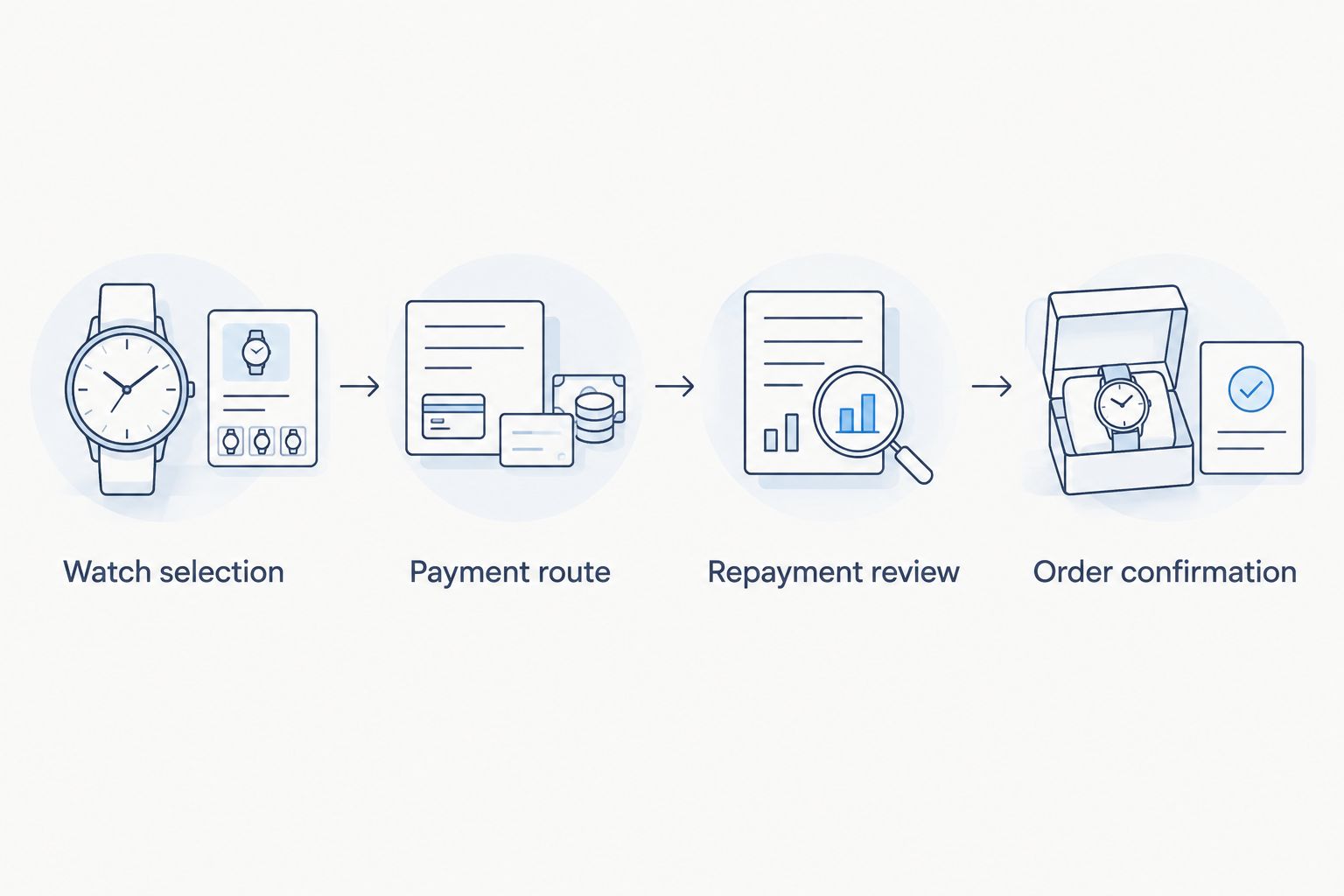
Payment authorisation and order confirmation
Complete the transaction carefully
- Recheck the retailer order summary immediately before authorisation. Confirm the selected watch and your delivery details.
- Complete the payment-provider steps only within the transaction flow you initiated. Do not share authentication codes with someone offering to complete the purchase for you.
- Save the payment confirmation and repayment agreement when they are provided. Keep them accessible outside the browser session.
- Locate the retailer’s order confirmation separately. Compare its watch description and order details with your saved purchase record.
- If either confirmation is unclear, establish the transaction status before attempting another purchase. Keep the relevant reference details ready for the appropriate support team.
Expected result: You have a retailer order record and a payment record that refer to the same intended purchase.
Retain 2 records as the minimum confirmation checkpoint: the retailer’s order confirmation and the payment provider’s transaction confirmation. Neither replaces the other. A retailer document describes the purchase; a payment document describes the associated financial arrangement.
Keep 1 order reference at the centre of your purchase file. Associate the listing, correspondence and payment records with that reference so you can explain the transaction clearly if a question arises.
Changing your selection before payment
A second workflow applies when you revise the basket before authorising payment. This is not a way to preserve an earlier offer: it is a reason to review the revised transaction from the beginning.
- Stop before authorising the current payment arrangement.
- Return to the watch selection and establish the details of the replacement timepiece.
- Recheck the retailer’s order summary and the payment methods offered for the revised basket.
- Review the repayment agreement presented for that transaction. Do not assume the previous schedule or decision carries over.
- Complete the confirmation checks only after the revised watch and payment arrangement both meet your requirements.
Expected result: Your purchase documents and payment agreement describe the revised selection rather than different versions of the basket.
Which workflow fits your purchase?
| Workflow | Best for | Advantage | Limitation |
|---|---|---|---|
| Confirmed selection | Buyers who have settled on an exact watch | Keeps watch checks and payment review in a single sequence | Does not eliminate transaction-specific eligibility checks |
| Revised selection | Buyers who change the watch before authorisation | Prevents reliance on terms attached to an earlier basket | Requires another review of the watch, order and payment arrangement |
For a 2026 purchase, neither workflow justifies assuming approval. Both end with the same test: the watch, retailer order and repayment agreement must describe the purchase you actually intend to make.
Troubleshooting
Tabby does not appear at checkout
Do not assume a technical failure or try to manufacture eligibility by changing personal details. Check that you are reviewing the intended order, then ask the retailer which payment methods apply to that transaction. Continue through Tabby only when the checkout offers that route.
Verification cannot be completed
Read the instruction or error displayed in the payment flow. Correct an identifiable typing error and use the provider’s support route if the verification problem remains unresolved. Never send identity documents or authentication codes to an unofficial intermediary.
The application is not approved
Treat the decision as a stop for that transaction. Review any explanation supplied by the provider rather than repeatedly submitting altered information. Reconsider the purchase independently of instalments; another payment method is appropriate only if it suits your finances and is offered by the retailer.
Payment appears complete, but no order confirmation arrives
Check your email, including filtered folders, and any order record accessible through your retailer account. Contact the retailer with the transaction details to establish whether the order exists. Do not immediately repeat payment: first determine the status of the original attempt.
You want to cancel after authorisation
Follow the retailer’s applicable cancellation process and read the payment provider’s instructions for the associated transaction. Obtain confirmation of what has been cancelled and how the payment record will be handled. Do not assume that sending a cancellation request automatically changes scheduled repayments.
Customize your workflow
Royal Watches buyers can make the process more deliberate by maintaining a purchase file before checkout. Include the reference, condition notes, documentation questions, written answers and the transaction terms you accept. Keep payment records in the same file, but clearly distinguish them from evidence about the watch.
Add a personal decision rule: authorise payment only after you have assessed the watch without reference to instalments. This protects the selection process from becoming a search for whichever transaction receives approval.
For a gift purchase, add the recipient’s preferences and the required delivery arrangements to your pre-payment checks. For your 2026 purchase archive, retain dated confirmations and correspondence rather than depending on your memory of a checkout screen.
FAQ
Can I buy a Rolex in Dubai with Tabby instalments?
Use Tabby for a Rolex purchase only when it is offered for your exact checkout transaction and you receive an agreement you accept. Check the watch and retailer terms separately before authorising payment.
Does Royal Watches guarantee Tabby approval?
Do not treat Royal Watches as a guarantee of Tabby approval. Establish the payment options for the intended order at checkout, then review any transaction-specific decision and agreement.
What do I need before applying to pay with Tabby?
Prepare the exact watch selection, your contact and delivery details, and access to the payment method and verification channels you intend to use. Follow the requirements displayed in the actual payment flow rather than assuming a fixed document list.
How many instalments will I pay for a Rolex?
Use the repayment schedule presented for your specific transaction. Do not assume a fixed payment count or timetable from another buyer’s agreement or an older promotion.
Does Tabby approval prove that a Rolex is authentic?
No: payment approval is not watch authentication. Review the individual timepiece’s description, accompanying documentation and the seller’s explanation of authenticity independently.
What should I do if Tabby is not offered for my order?
Stop the Tabby workflow and ask the retailer which payment methods apply to the purchase. Do not assume that changing the basket or repeating verification will produce an instalment offer.
Can I change my Rolex selection after reviewing a Tabby offer?
If you change the selection before authorising payment, review the revised order and payment agreement again. If payment has already been authorised, establish the existing transaction’s status with the retailer and provider before arranging a replacement purchase.
One last thing
The most useful purchase record is not a screenshot of an instalment option. It is a matched set of documents identifying the watch, the retailer order and the repayment agreement. Before closing your 2026 transaction, make sure those records describe the same purchase.
Choose the watch on its merits; accept the payment arrangement on its terms. Keeping those decisions separate is the central discipline of buying a luxury timepiece with instalments.
Related guides
- Luxury watches for first-time collectors
- Rolex Datejust watches
- Buying a Rolex in Dubai and reclaiming VAT
