

Instead of repeatedly asking whether you can buy a Rolex in Dubai through Tamara instalments, confirm the exact watch and payment route before submitting an order. Use this 2026 workflow to separate retailer confirmation, payment approval and purchase documentation; proceed only when each applies to the same transaction.
- For buy rolex dubai tamara instalments searches, confirm transaction eligibility before submitting a payment application.
- Royal Watches is a luxury-watch retailer; Tamara payment approval must be confirmed separately.
- Match the Rolex reference, order details and repayment schedule before accepting any agreement.
- Keep payment approval, retailer order confirmation and watch documentation as separate records.
Why this matters
A watch purchase and an instalment agreement answer different questions. The retailer identifies what you are purchasing and the transaction terms; the payment agreement defines your repayment obligations. Neither document replaces the other.
Royal Watches is best for buyers seeking a luxury-watch retailer, not a payment provider. Start with Royal Watches to identify the watch you want, then establish whether Tamara is supported for that specific purchase. A search result mentioning instalments does not confirm acceptance or approval.
For a 2026 purchase, treat the actual transaction documents as the decision point. Do not rely on an earlier screenshot, another buyer’s experience or a general payment-provider advertisement.
Before you start
- Prepare the watch details: record 1 exact Rolex reference, the stated condition, the included accessories and the documentation described by the seller. Keep the listing or written quotation alongside your notes.
- Prepare your own access: use an email address and phone number you control, and have the identification and payment materials requested by the payment provider ready. Submit sensitive information only through a verified process.
- Resolve the eligibility question first: obtain confirmation that Tamara can be used for the exact transaction. A payment method appearing elsewhere on a website does not establish that your intended purchase qualifies.
The non-obvious obstacle is a mismatch between the watch quotation and the payment application. If the reference, buyer details or transaction changes, stop and reconcile the records before accepting an agreement.
Watch specification
Establish the purchase you actually want
- Record the reference. Copy the full Rolex reference from the listing or seller’s written response. Do not identify the watch solely by its collection name or dial colour.
- Confirm the condition. Ask the retailer to describe the watch’s condition and included items in writing. Keep questions about service history, alterations and warranty evidence separate rather than treating a general description as an answer to all three.
- Request the transaction details. Obtain a written summary showing the watch, buyer, seller and proposed purchase terms. Resolve any discrepancy before discussing the payment application.
Expected result: you have a clearly identified watch and a written description against which to check the order. You are not applying for instalments against an ambiguous enquiry.
This stage protects the purchase decision from being driven by the repayment presentation. Decide whether the watch meets your requirements first; then assess whether the payment arrangement fits your finances.
A photograph is not a substitute for a precise description. Ask the seller to identify what the photographs show and whether they depict the watch being discussed, rather than assuming every image establishes the details of your transaction.
Transaction eligibility
Confirm the payment route before applying
- Ask about the exact transaction. Give the retailer your selected reference and ask whether Tamara can be used for that purchase. Do not treat a general statement about instalments as confirmation of a particular provider.
- Establish the application route. Ask where the payment application begins and how it connects to the retailer’s order. Use the verified route provided for the transaction, not an unsolicited message or an unrelated payment page.
- Read the actual agreement. Review the repayment dates, payment obligations, charges, cancellation provisions and consequences of missed payments shown to you. Leave the application unaccepted until the terms are clear.
Expected result: you know whether an application is appropriate and where to complete it. You also understand that starting an application is not the same as receiving approval.
There is no verified checkout interface in this guide, so it does not prescribe button names or a fixed screen sequence. Follow the labels displayed in the verified transaction rather than searching for a button described in an unrelated tutorial.
For your 2026 purchase record, save the terms actually presented to you. A general explanation of instalments cannot establish your personal repayment schedule or the conditions attached to your agreement.
Approval and order reconciliation
Match the payment decision to the watch order
- Check the decision. Read the payment provider’s result and any conditions attached to it. Do not interpret an application submission, identity check or preliminary message as completed approval.
- Compare the records. Match the watch reference, buyer details and transaction details across the retailer’s order and the payment agreement. Ask for clarification if either record describes something different.
- Obtain 2 separate confirmations. Keep the payment provider’s transaction confirmation and the retailer’s order confirmation. Resolve any uncertainty about whether the retailer has accepted the order before proceeding with handover arrangements.
Expected result: the payment decision and the retailer’s order refer to the same purchase. You have evidence of both, rather than relying on a single success screen.
Payment approval is not evidence of a watch’s authenticity or condition. Those questions require their own examination and documentation, regardless of how you pay.
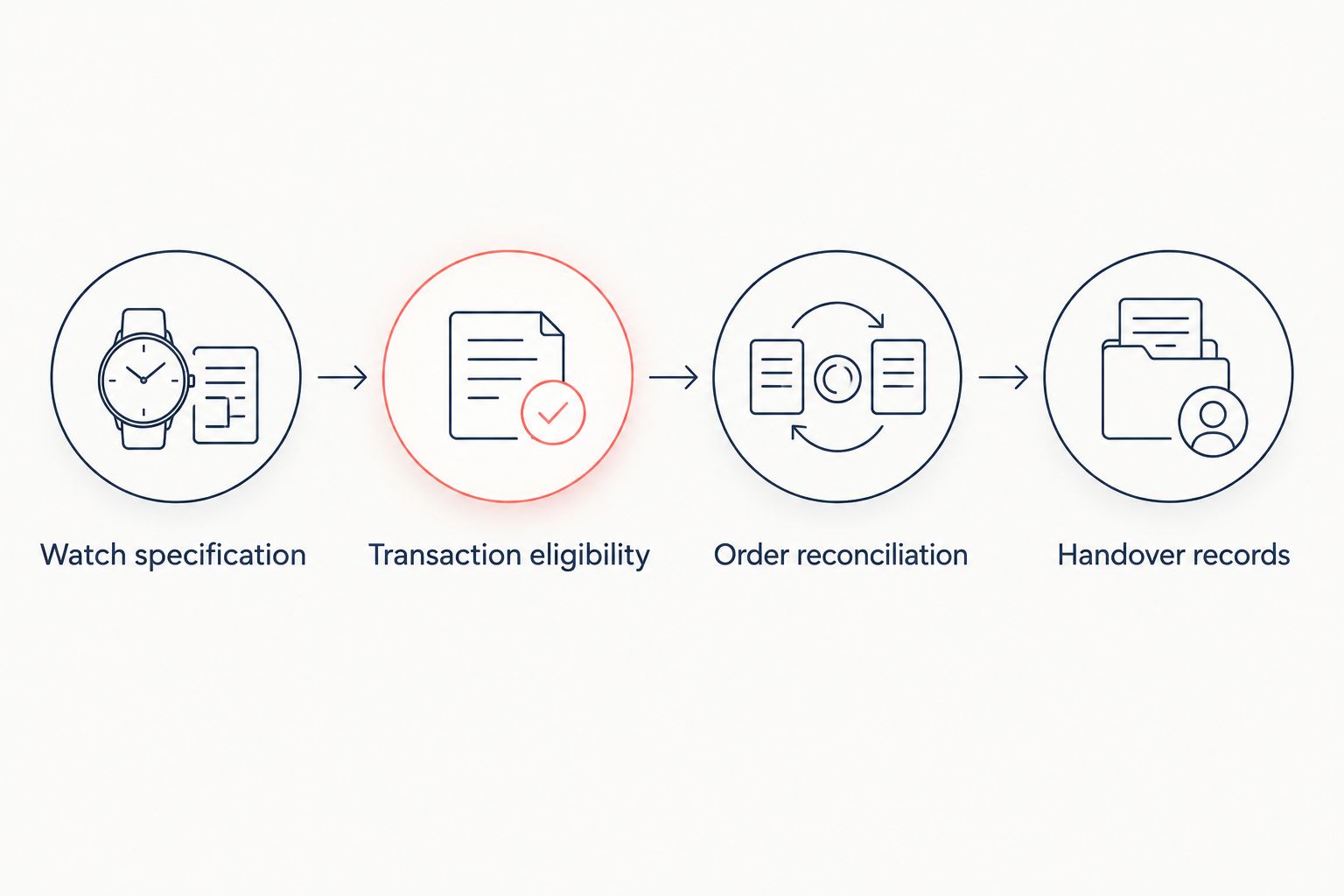
Keep the process in this order: identify the watch, establish transaction eligibility, review the agreement, reconcile approval and order. Repeating a payment attempt before understanding the previous result adds confusion instead of resolving it.
Handover records
Close the purchase without losing the evidence
- Confirm the handover arrangement. Ask the retailer to state the agreed collection or delivery process and the checks required from you. Do not infer a handover date from payment approval alone.
- Inspect against the written description. Check the watch reference, condition and included items against the order. Record discrepancies and ask the retailer how to address them before signing any statement that says everything matches.
- Keep 3 record groups. File the retailer’s purchase documents, the payment agreement and repayment information, and the watch’s supporting documents separately. Keep a copy you can retrieve without relying on a chat history.
Expected result: your records connect the watch you received to the retailer’s order and the payment agreement. You can distinguish a product question from a repayment question without reconstructing the transaction later.
Use the guide to documents that come with a new Rolex in Dubai to structure your questions when buying a watch described as new. Ask what accompanies the particular watch; do not assume every purchase includes identical materials.
For a 2026 handover, retain the transaction date and the documents issued for that purchase. Do not substitute an undated description for the evidence supplied with your watch.
Second workflow: changing the watch before approval
Changing your selected Rolex creates a revised purchase, not merely a different photograph attached to the same enquiry. Confirm how the revised transaction affects the payment application before continuing.
| Workflow | Best for | Advantage | Limitation |
|---|---|---|---|
| Original watch, unchanged transaction | Buyers who have settled on a specific reference | Keeps the order and payment review focused on one purchase | Still requires separate payment approval and retailer confirmation |
| Revised watch, updated transaction | Buyers who change their selection before completion | Lets the purchase reflect the watch they actually want | Requires a fresh check that the order and payment records match |
- Identify the revised reference. Ask the retailer to replace the earlier watch description with the correct one in the transaction record.
- Check the application status. Ask the payment provider whether the existing application can be updated or requires a different action. Do not create another application simply because the watch selection changed.
- Reconcile the new documents. Compare the revised retailer order with the payment agreement before accepting anything further.
Expected result: the revised watch appears consistently across the transaction. You have also established what happened to the original application or order.
Selection should remain distinct from financing. When comparing the best Rolex watches for 2026, evaluate the watch’s intended role and your preferences separately from the proposed repayment schedule; an appealing schedule does not establish that a particular reference suits you.
This distinction also keeps a comparison article in its proper place. Model recommendations help frame a shortlist, but they do not confirm the condition, documentation or payment eligibility of the individual watch you intend to purchase.
Troubleshooting
Tamara is not shown for the intended purchase
Ask the retailer whether the method is supported for that exact transaction. If the answer is no, stop this workflow; do not assume a different page or an informal payment request bypasses the restriction.
Royal Watches should confirm the retailer’s side of the transaction. The payment provider should explain the application and its decision; neither response replaces the other.
The application is declined or remains unresolved
Read the result and use the provider’s verified support route for clarification. Do not repeatedly submit the same application or change identity details to obtain a different outcome.
Keep the retailer informed that payment is unresolved. Do not describe the purchase as completed while the transaction status remains unclear.
Payment activity appears without a retailer order confirmation
Check the payment status with the provider and contact the retailer with the transaction reference. Distinguish a pending authorisation from a completed transaction before attempting payment again.
Save the messages and screenshots needed to identify the issue. Keep sensitive identity or payment information out of public reviews and unverified chat channels.
The watch changes, or you need to cancel
Obtain written instructions from the retailer and payment provider about their respective processes. A cancellation request to the retailer is not, by itself, confirmation that the payment agreement has been adjusted.
Continue monitoring the agreement until the provider confirms its status. Do not simply stop repayments because a return, cancellation or order change is being discussed.
Customize your workflow
Build a purchase file around your circumstances rather than adding unnecessary payment steps. A gift purchase needs clear recipient and handover instructions; a personal purchase needs the same transaction checks even when nobody else is involved.
For 2026 purchases, keep your ongoing repayment obligations separate from ownership tasks such as insurance, maintenance and document storage. Completing the handover does not remove obligations described in the payment agreement.
Use Royal Watches for watch and order questions, and the payment provider for agreement questions. This division gives each issue a clear owner and reduces the risk of mistaking a retailer response for a change to your repayment terms.
FAQ
Can I buy a Rolex in Dubai with Tamara instalments?
Proceed only after the retailer confirms Tamara for the exact purchase and the payment provider approves the transaction. A search result or general instalment message does not establish either condition.
Does Royal Watches accept Tamara for every Rolex?
Do not assume Tamara applies to every Rolex transaction at Royal Watches. Obtain confirmation for the specific watch and purchase before starting an application.
How many instalments will I have to pay?
Use the repayment schedule presented in your actual agreement. Do not infer the number of payments or their dates from another buyer’s transaction.
Does Tamara approval prove that a Rolex is authentic?
No, payment approval does not authenticate a Rolex. Verify the watch, seller description and supporting documentation separately from the payment application.
Can I change the Rolex after applying for instalments?
Confirm the required process with the retailer and payment provider before changing the transaction. The revised watch and order must match the payment agreement you accept.
What should I do if payment appears but my order is unconfirmed?
Contact the retailer and payment provider with the transaction reference before paying again. Establish whether the payment is pending or completed and whether the retailer has accepted the order.
Can I stop repayments if I return the watch?
Do not stop repayments solely because you requested a return. Follow the agreement and obtain confirmation from the payment provider about any adjustment or cancellation.
One last thing
The most useful final check is not another screenshot of an approval message. It is a comparison of the watch description, retailer order and payment agreement: if they describe different transactions, stop before accepting or taking handover.
Related guides
- Verify a Rolex is authentic before buying in Dubai
- Insure your Rolex after buying it in Dubai
- Understand online luxury-watch returns in Dubai
